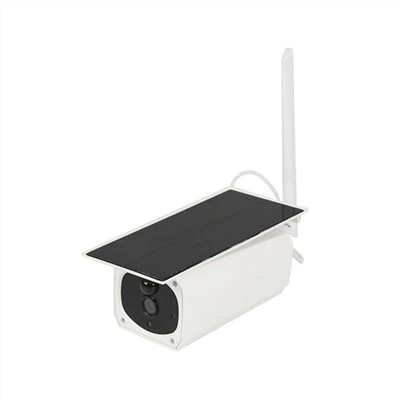
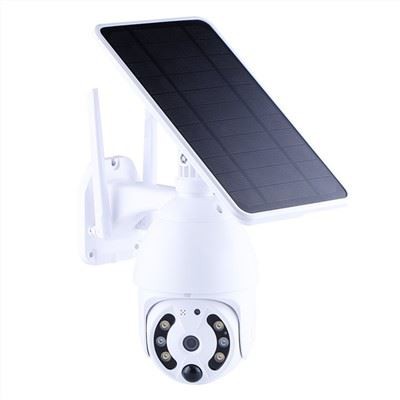
Custom CCTV Camera Manufacturer
SURE SAFE TECHNOLOGY CO., LTD. has been one of the leading CCTV systems solution and service suppliers for many years. The company specializes in wind and solar hybrid monitoring systems at present, aiming to deliver cost-effective and fit-for-purpose solutions.
Why Choose Us
Rich Experience
We have 10+ years of experience in CCTV system solutions. With extensive knowledge in developing CCTV cameras, we have our own SMT chip placement machines and injection molding machines and can customize camera designs for customers.
Wide Product Range
We specialize in CCTV systems and CCTV cameras, including wind and solar hybrid monitoring systems, home monitoring systems, car monitoring systems, nanny monitoring systems, low-power solar cameras, 4G cameras, hidden cameras, etc.
Professional Service
We guarantee that each order will be strictly inspected before shipment. At the same time, if customers have any after-sales requirements, we will provide improvement measures and the best solution as soon as possible.
OEM & ODM Available
OEM & ODM orders are very welcome. Our professional engineering team work on developing OEM&ODM camera and the quality of our products are always met by our clients. There are around 40 new cameras launched every year.


The 4g home monitory IP camera is specially designed for remote areas to solve the problems of any wiring. No wire for communication, 4G bulb camera for your care, suitable for home, shop, factory, warehouse, etc.

4g Outdoor Waterproof Solar Camera
The 4g outdoor waterproof Solar camera supports real-time motion alerts via APP. When the PIR mode is turned on, the adjustable movement sensitivity can avoid false alarms through Your camera and reduce power consumption. Having a high resolution of real 2MP FULL HD to Choose, a 4g solar camera can capture crystal clear videos, you can see more valuable detail to identify people, vehicles, and more objects all day.

4G Surveillance Camera For Farm
Super HD 2560x1920(5 million pixels)and real 1080p full HD to choose, from can capture crystal clear videos, You can record and observe more valuable details to identify people, vehicles, and more objects throughout the day. Protect your home 24/7-Having the function of motion detection, the 4G 5MP HD 1080P car camera can provide you with 24/7 protection. When motion is spotted, you will receive an instant alert to know that someone is approaching your home.

Mini Wireless Home Surveillance Camera
This Mini wireless home surveillance camera has a mini body with a magnetic stand, you can install any position. Not only used as a home surveillance camera but also as a driving recorder. Turn on the mini camera, connect it to WiFi, and add it to the app. Designed so you can set up yourself with ease. No wiring, no professional installation required. Keep an eye on family, pets, housekeepers and nannies, home or office. Many other uses as well.

Waterproof IR camera with 4g can watch and record high-definition video, builtin 4pcs infrared light, you can see clearly at night, get clear quality images in the dark, night view distance can up to 15m. Support TF card and cloud storage, insert TF card (not included) to watch video playback. By exhausting the space of the memory card, the video loop will automatically overwrite the oldest video file; two-way intercom, remote monitoring.

Our CCTV Security IP Camera 4G is a wireless camera that utilizes 4G technology to provide real-time surveillance footage. It comes equipped with dual antennas to ensure that the camera receives a stable and reliable signal. This camera features a high-definition camera lens with a resolution of 1080p that can capture clear and crisp images, day or night.

The camera comes with an 8PCS rechargeable Battery and Solar Panel. It can finally become truly wireless, free from outlets and extension chords when a 4G IP solar camera has a solar-energy power system, backed up with a rechargeable internal battery. No more annoying wire problems, just install the camera anywhere you want. It helps you keep a close eye on your lovely children and pets.

Metion Detection Surveillance Camera With 4G
The sun shines on the solar panel, and then the solar panel converts the solar energy into electrical energy for the motion Detection surveillance camera with 4G use during the day and stores excess power in the lithium battery. Built-in 4 pcs 18650 batteries. No need for power facilities and network wiring, saving labor costs for a Wi-Fi connection, like a mobile phone.

Low Power Solar Surveillance Cameras
Low Power solar surveillance cameras have advanced high-technology motion sensor that allows the reduction of false alerts, when PIR motion is triggered, it will send alarm notifications to your smartphone and record a short video clip of the event to a removable micro SD card(Max 128GB, Not included) or cloud storage(30 days free trial).

4G Solar Panel Security Camera
4G solar panel security cameras support 4G-LTE without the need for Wi-Fi, making them ideal for indoor and outdoor areas with limited or no WIFI access to the internet. They are suitable for fishponds, meadows, backyards, gardens, driveways, porches, and even in the wild. A cellular data plan SIM card (including a Nano SIM card) is required!

Wireless Outdoor Security Camera For Home Security
With 1080P 15fps resolution, the Wireless Outdoor Security Solar Camera captures sharp and bright videos. Offers ultra-clear images and videos regardless of weather.12 infrared lights automatically sense the ambient light drop and switch to the night vision mode when needed, making it possible to see objects as far as 9ft clearly, the max distance is 65ft at night. With IP66 which is water-resistant, it can work under rain or sun exposure, and it can be put in any outdoor environment.
Brief Introduction to CCTV Camera
CCTV, which stands for Closed Circuit Television, is a system that uses video cameras to transmit signals to a specific set of monitors or recorders for surveillance purposes. These cameras are commonly used in both public and private settings to monitor activities, deter criminal behavior, and ensure safety and security. By capturing real-time footage of people or events in designated areas, CCTV cameras play a crucial role in maintaining law and order. Whether it's monitoring traffic flow in busy city centers or safeguarding residential properties from burglaries, these versatile devices have become an integral part of modern-day security systems.

A CCTV system can be as simple as a wire-free camera connected to your smartphone, or it can be as complex as many cameras, connected to various monitors across several buildings. Regardless of the size or type of CCTV, they all work in a similar way. Cameras, which are strategically placed, capture live footage of a particular area. The footage is then transmitted to a recording device (DVR or NVR), and a monitor, smartphone, or computer. While the footage is shown in real time on the monitor, the recording device stores the video for later reference. Some modern CCTV systems may not have a local recording device-instead, the footage may be stored in the cloud.
Features of CCTV Cameras
High-Definition and Wide-Angle Video
One of the most important features any CCTV camera should have is high definition and wide-angle video. The main purpose of a CCTV camera is to capture images for future reference and perusal. If the video quality is not up to par, the whole purpose of a CCTV camera would be lost. A high-definition camera would provide high picture quality, and one with a wide-angle lens would enable it to cover a much wider area as well.
Night Vision/Low-Light Cameras
Having a low-light vision is an important prerequisite for any CCTV camera. The importance of having a CCTV camera with night vision or low light vision becomes prominent when any crimes or adverse incidents occur at night. Night vision cameras will help you capture the image or incidence in perfect clarity, irrespective of the lack of light.
Remote Access
Another integral feature you must definitely have in a CCTV camera is remote access. Many of the latest models have a remote access facility wherein you can access the live footage from your mobile or computer device. This becomes particularly helpful in cases where you are out of station and you can be assured of the safety and security of your premises. Remote access cameras provide much needed sense of control and assurance, which are the major driving factors behind installing CCTV cameras in the first place.
Automatic Network Recovery
Now most of the CCTV cameras come with a feature called Automatic Network Recovery (ANR). This allows the CCTV cameras to automatically store video recordings into the camera's SD card when the network is disconnected. The video recordings will be sent back to the storage server once the network has been restored. Thus, all of the video recordings would be saved even if the network fails temporarily. No network link is required to do this process, so it means the camera can act as a completely standalone device when the recorder is down.
Intrusion Detection
Last but not least, Intrusion Detection is also an essential feature to look for in CCTV camera systems. Intrusion detection is a video analytics function on security cameras. Intrusion detectors watch an area by detecting and surveying movements to capture events. The Intrusion feature is an intuitive Smart Detection method that is used to capture break-ins or other criminal activity. Intrusion Detection CCTV cameras can be used for supervising a warehouse, retail store, banks etc.
Advantages of CCTV Camera
One of the most significant and obvious benefits of security cameras is that they act as a powerful crime deterrent. A would-be criminal is less likely to do anything illegal if they know they are being watched. If a person knows that they won't be able to get away with an act, they are less likely to consider committing it. For businesses, installing security cameras can significantly help cut down on shoplifting and employee theft. Such activities can cost companies hundreds of thousands of dollars in damages, and such figures far exceed the amount you will ever pay for installing security cameras at your premises.
Installing security cameras gives a sense of security and provides peace of mind. Real-time monitoring lets you know exactly what is happening. It empowers you by knowing that your home or office is not an easy target for criminals. In offices with security cameras installed, employees know that if their belongings get stolen, they will easily catch the criminal. Employers are reassured that employees won't risk damaging or stealing business property for fear of being caught. Residents at home can sleep more peacefully, knowing that criminals are far less likely to attack a property with a sound surveillance system.
The justice system demands evidence to convict a criminal. In the unfortunate event, crime occurs, security cameras can come in handy. Many modern systems can record videos in great detail and precisely capture sounds. Eyewitnesses can often be unreliable or not always around to report a crime. The recordings from the security camera can capture the moment and make it easier to discover the criminals identity and bring them to justice. The recordings can also help investigators better understand how the events unfolded and who else might likely be a suspect in a crime.
Disputes between employees can arise, and not each side would have the incentive, to be honest. This would make arriving at a settlement difficult, with the added risk of penalizing the wrong party. Security cameras can tell you precisely what happened, allowing you to know what is the truth and what it isn't, and thus, will enable you to better deal with the dispute at hand. Family feuds, disagreements between children, and other such cases can be well-taken care of if you know precisely what happened and how it happened.
By better knowing and understanding exactly what is happening, employers can better know what policies could work and which won't. Installing security cameras can help by giving employers access to real-time monitoring of their premises and granting them a better idea of the day-to-day activities of their employees at the office.
Common Types of CCTV Camera
Outdoor
There are various types of outdoor cameras, and they're all built using strong, weatherproof materials. Rain, hail, snow, and heat will not affect the performance of these CCTV cameras. Outdoor CCTV cameras can usually adjust to different lighting conditions, and most are equipped with motion sensors.
Indoor
Indoor CCTV is installed in a variety of settings-from office buildings and shopping malls, to banks and secure facilities. The main difference between indoor and outdoor cameras is that indoor cameras are not built to withstand the elements, which makes them smaller, and more lightweight. Indoor cameras are often lower in price than outdoor cameras.
Bullet
Bullet cameras are the most commonly used outdoor CCTV cameras. They are large and noticeable, and can often be spotted on the external corners of large buildings and facilities pointing towards car parks, entries, and exits. These cameras are great for long-distance, and night-time viewing.
Dome
Dome CCTV cameras are versatile and sleek. They're often used in banks, casinos, and hotels, where they are discretely positioned on ceilings and walls. As their name suggests, they have a clear dome encasing to protect them from vandalism, and the elements.
Pan-tilt-zoom (PTZ)
Pan-tilt-zoom cameras are dome-shaped cameras too, but they can be remotely controlled. The person in charge of security can remotely angle the camera in any direction, and zoom into a particular spot to reveal details, such as facial features or license plates.
Turret
While very similar to dome-shaped cameras, turret CCTV cameras lack the external protective glass encasing that dome cameras have. Turret CCTV cameras are known for capturing crisp and clear images, whereas the glass encasing on dome cameras can cause glare, and even obscure the footage if it's dirty.
1. Traffic Monitoring
Often strategically placed on highways, intersections, and high-traffic areas, CCTV cameras are used by law enforcement officers to monitor traffic, and to watch out for those driving in a way that may endanger others.
2. Public Transport
CCTV cameras are now installed at most bus and subway stations. They're used to monitor unusual or suspicious behavior, and to identify criminals. If there was an emergency, rescue and emergency workers could use CCTV footage to assess the situation before entering the building.
3. Airports
There are CCTV cameras strategically installed throughout airports. Usually, they cover every entry and exit in order to capture everyone who comes into the airport. CCTV cameras are also used to monitor confrontations and suspicious behavior.
4. Businesses
Banks, museums, hotels, restaurants, and stores have CCTV cameras to monitor the activities of not only their visitors, but also potentially their workers. The CCTV cameras are there to deter crime, but in the event that a crime does happen, the footage can be used to aid an investigation, as well as provide evidence.
5. Home Security
CCTV cameras are easier to purchase and set up now than they ever have been. Affordable cameras can be ordered online and set up wirelessly with minimal technical know-how. Many people now choose to have CCTV set up so that they can monitor their homes while they are at work, or away for long periods. Not only does CCTV offer peace of mind, but it can also be used to identify criminals if the worst was to ever happen.
Components of CCTV Camera
Visor
It is used so that unwanted light does not intervene in the image captured by the surveillance camera, in this way backlight is avoided and blind spots due to reflection are reduced.
Iris
It is part of the optics and controls the light that enters the sensor. The iris can be manual or automatic. If it is automatic (auto iris) it adapts to the light of the stage in the same way that the human eye does, avoiding white or completely dark images.
Optics
There are different types of optics that can be adapted to cameras depending on the characteristics of the sensor, iris opening, sensitivity, objectives (fixed, motorized zoom…), focal length… By being able to configure the camera with different optics, the field of view of the CCTV camera can be optimized.
Box Camera
This type of video surveillance camera allows you to change the type of lens depending on the angle of vision and zoom that is needed. You can also change the box camera for others of higher quality or different technologies.
Anti-Vandal Protection
Protects the CCTV camera from any inclement weather such as snow, rain, hail… and shocks, it remains fixed capturing images of everything that happens. It is indicated for its operation outdoors.
Infrared LEDs
They have activated automatically when there is little light, allowing the video surveillance camera to record in the dark and in low light situations in black and white (0.01 lux).
Steps to Maintain and Clean Your CCTV Cameras
It's no secret that cleaning your CCTV cameras regularly is of great importance, as dust and grime can build up on the lens over time and affect their performance. By keeping them polished, not only will you get crystal-clear footage, but you'll also extend their lifespan.
Tools and Materials Needed
If you want to keep your CCTV cameras in good condition, you need some essential tools. These include a microfiber cloth for gentle cleaning, isopropyl alcohol or lens cleaner for tough spots, a soft brush to dust off, and compressed air for difficult-to-reach spots. If your cameras are installed at a higher point, a ladder or step stool may be required.
Step-By-Step Cleaning Guide
1.Exterior Cleaning
● Wiping down the Camera Body
To avoid any unintended damage while cleaning, it's important to turn off the camera first. To clean your camera, utilize a cloth that's soft and free of lint, such as a microfiber cleaning cloth. Be sure to be gentle as you wipe down the body, focusing on areas like buttons, switches, and ports where dust tends to gather. Use a circular motion to remove surface dust and grime. If you come across stubborn spots, slightly dampen the cloth with either water or a mild detergent solution, but be careful not to let any moisture get inside the camera.
● Cleaning Camera Mounts and Housings
Inspect the camera mounts and housings for signs of dirt or corrosion. Tighten any loose screws or brackets to ensure the camera remains securely in place. To clean these parts, use a cloth dampened with a mixture of water and a mild detergent. Be cautious not to oversaturate the cloth, as excess moisture can seep into the camera. Consider applying a rust inhibitor for metal components to prevent corrosion in outdoor installations.
2.Lens Cleaning
● Gentle Dusting with a Soft Brush
Begin cleaning the CCTV camera lens by removing loose dust and debris. Use a soft brush or lens cleaning brush to sweep away any particles from the lens surface gently. This prevents scratches during the next steps.
● Using Compressed Air for Hard-To-Reach Spots
Compressed air can be invaluable for reaching tight spaces around the lens and inside crevices. Use short bursts of compressed air to dislodge any remaining dust or dirt. Ensure the camera is still turned off to prevent particles from being blown into the internal components.
● Wiping with a Microfiber Cloth and Cleaner
For a thorough lens cleaning, apply a few drops of specialized lens cleaning fluid to a microfiber cloth designed for optics. Microfiber cloths are gentle on the lens and highly effective at removing smudges and fingerprints. Gently wipe the lens surface in a circular motion, working from the center outwards. Avoid pressing too hard, as excessive force can damage the delicate lens coating.
3.Interior Cleaning (If Applicable)
● Accessing the Camera Interior
If you suspect bugs, dust or dirt has made its way inside the camera housing, consult your camera's user manual for instructions on safely accessing the interior. Sometimes, you may need to remove screws or panels to gain access. Ensure the camera is disconnected from power before attempting any internal cleaning.
● Dusting and Cleaning Internal Components
Use a soft brush or compressed air inside the camera housing to carefully remove loose dust from internal components. Pay attention to the image sensor and other sensitive electronics. If there is visible dirt or residue, use a lint-free cloth lightly dampened with isopropyl alcohol to clean it. Take extreme care not to touch the lens or any electronic connections, as these are highly sensitive components.
Post-Cleaning Maintenance
After successfully cleaning your security cameras, performing some post-cleaning maintenance is essential to ensure they continue to function optimally. Here are two critical steps to take:
● Checking camera alignment and focus: Over time, camera mounts or fixtures can shift, causing the camera's alignment to drift or lose focus. After cleaning, verify that your cameras are still pointing in the right direction and that the focus is sharp. You can access your camera's live feed through your monitoring system and make any necessary adjustments. A well-aligned and focused camera provides clear and accurate surveillance footage.
● Testing camera functionality: Once the camera is clean and properly aligned, you should test its functionality. Check if all the camera's features, such as motion detection or night vision, work as expected. Review recent footage to ensure there are no glitches or issues. Regularly testing your camera's functionality helps identify potential problems early, allowing for timely maintenance or replacements if needed.
Incorporating these post-cleaning maintenance steps into your routine ensures that your security cameras remain reliable and effective in safeguarding your property.
Common Cleaning Mistakes to Avoid
● Using Harsh or Abrasive Materials
One of the most crucial mistakes is using abrasive materials like paper towels, rough cloths, or even scouring pads to wipe your camera lenses. These can scratch the lens or protective housing, leading to blurry or distorted footage. Instead, use soft, lint-free microfiber cloths to gently clean the surface.
● Spraying Cleaner Directly onto the Camera
Never spray cleaning solutions directly onto your security cameras. This can result in excess liquid seeping into sensitive components and potentially causing electrical damage. Instead, apply the cleaner to your cloth and gently wipe the camera lens and housing.
● Overcleaning or Using Excessive Force
Overcleaning can do more harm than good. Frequent cleaning is important, especially in dusty environments, but avoid excessive force. Scrubbing too hard can damage the camera's protective coatings or even misalign the lens. A gentle touch is all that's needed.
The Considerations for Buying CCTV Camera
Area of Surveillance
You have to decide whether you will install the cameras outdoors or indoors. Although most cameras are designed for use both inside and out, not all can handle cold temperatures and adverse weather conditions, so double-check this carefully before committing to a purchase.
Location Size
How big is the area you want to cover? If it is substantial, then you will need powerful cameras such as the PTZ. They have the ability to cover wide areas and zoom closer to a particular subject. They are also a more economical option instead of installing several static cameras.
Privacy
Do you want the CCTV cameras to be discrete, or do you want them to act as visual deterrents? Bigger cameras such as bullet CCTV cameras are obvious reminders that the area is under surveillance, which can help to scare away criminals. However, if you want to be more discreet, dome cameras or PTZ cameras are best.
Video Quality
High-resolution cameras are more expensive, so survey the area you want to monitor before buying. For smaller spaces such as offices, you don't need very high-resolution camera. However, if your area is prone to theft and burglary, you may need high-quality output for identification purposes. You should also check if the camera supports day and night recording and poor lighting conditions. Most cameras use artificial illuminators and IR filters for clearer images.
Storage
Storage is often overlooked, but it is a very important factor to consider. For commercial use, especially, you never want to lose your surveillance footage. Ask an expert to help you calculate how much storage space you will need before buying.
Scalability
If you plan on adding more cameras in the future, go for the new IP cameras that connect over a wireless network. Traditional CCTV cameras have a closed circuit and are difficult to scale because everything is hard-wired.
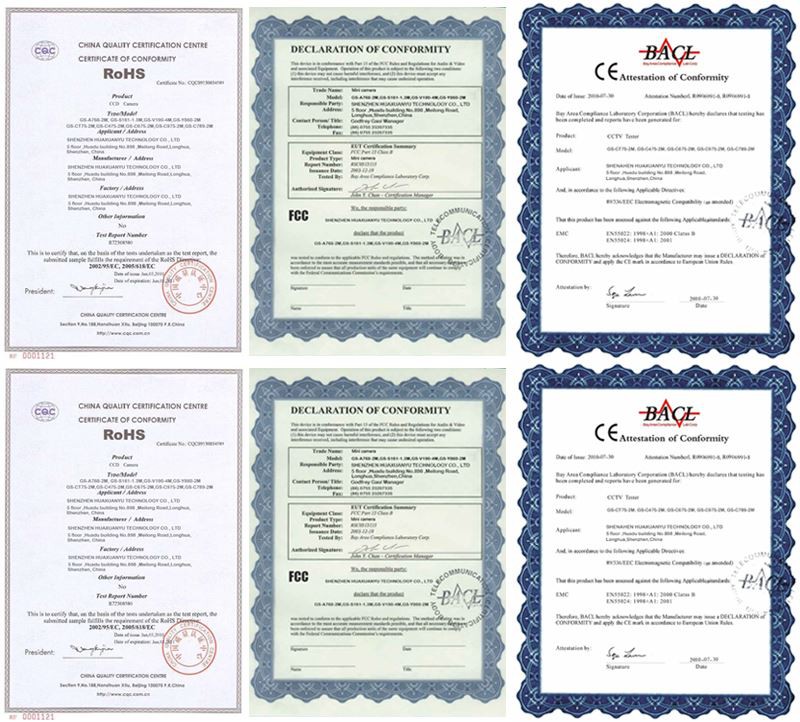
The factory was established in 2012, covering 20000 square feet, and has extensive knowledge in developing CCTV cameras.We have passed CE and FCC certifications.
Hot Tags: cctv-camera, China cctv-camera manufacturers, factory, wifi bullet camera, cctv dvr system, wifi intelligent solar energy alert ptz camera, solar panel for ip camera, solar powered security camera with light, wireless ip camera system